Step 01: Introduction
Adding an AI API to a web application can take only a few lines of code.
Building an AI feature that users can actually depend on is a different problem.
A production AI feature needs to handle much more than generating a response.
It needs to consider:
- Authentication
- Data access
- Context
- Streaming
- Structured output
- Tool calling
- Error handling
- Rate limiting
- Usage tracking
- Cost control
- Security
- Reliability
This is where I think AI development becomes interesting.
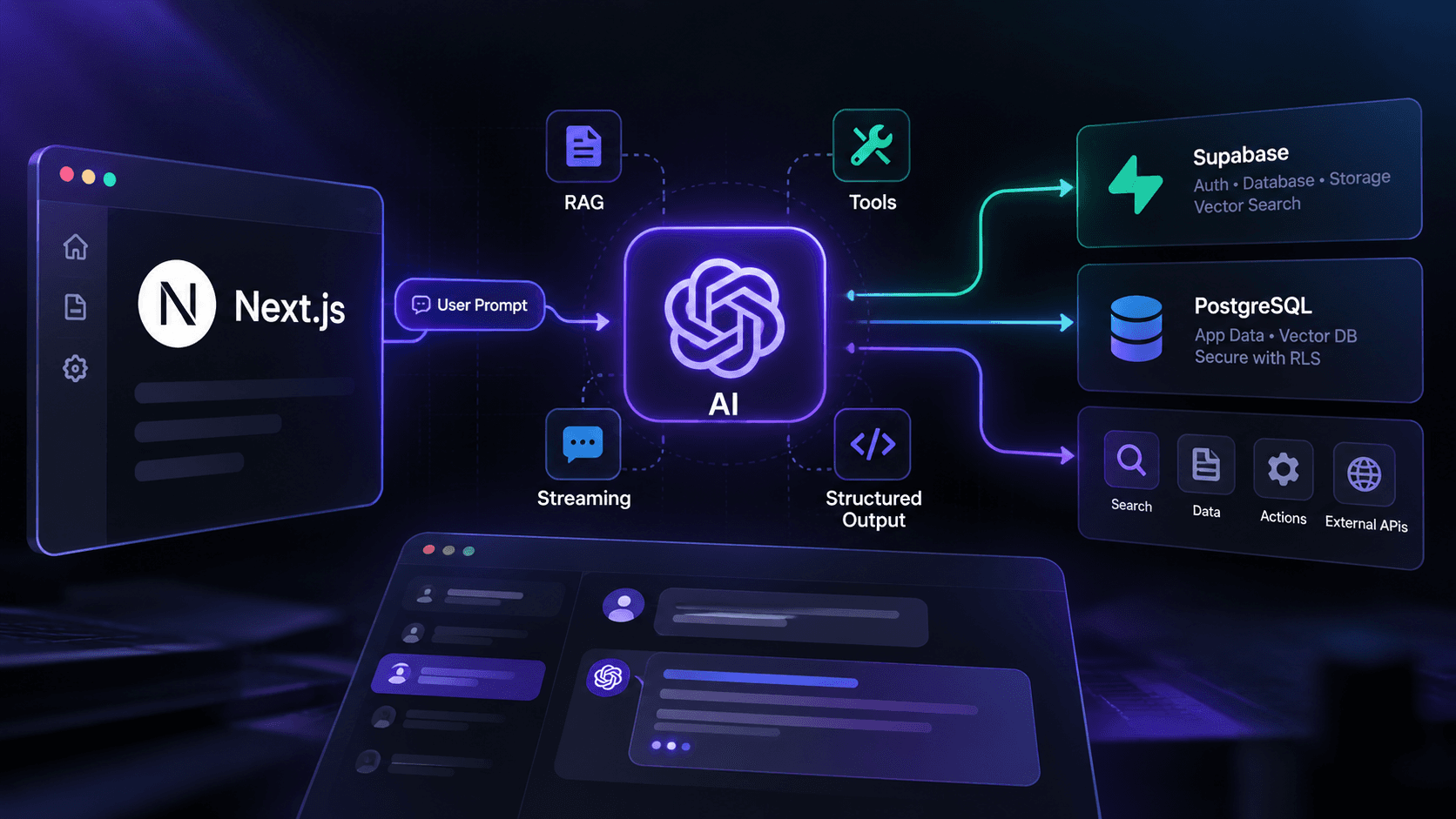
In this article, I'll explain how I approach building production-ready AI features in modern Next.js applications and how I connect AI capabilities with application data, authentication, and backend services such as Supabase and PostgreSQL.
Step 02: An AI Feature Is More Than a Prompt
A simple AI implementation might look like this:
textUser ↓ Prompt ↓ AI API ↓ ResponseThat works for a prototype.
A production application usually looks more like:
text┌─────────────────┐ │ User │ └────────┬────────┘ │ ▼ ┌─────────────────┐ │ Next.js UI │ └────────┬────────┘ │ ▼ ┌─────────────────┐ │ Server / API │ │ Authentication │ └────────┬────────┘ │ ┌──────────────┼──────────────┐ │ │ │ ▼ ▼ ▼ Context Tools AI Model │ │ │ └──────────────┼──────────────┘ ▼ ┌─────────────────┐ │ Supabase / DB │ └─────────────────┘The AI model is only one part of the system.
The application around it determines whether the feature is secure, useful, and maintainable.
Step 03: 1. Keep AI Requests on the Server
One of the first rules I follow is simple:
The browser should not own sensitive AI credentials.
Instead of sending requests directly from the client to an AI provider, I prefer routing them through server-side logic.
Conceptually:
textBrowser │ ▼ Next.js Server │ ├── Authenticate user ├── Validate request ├── Load context ├── Apply limits └── Call AI provider │ ▼ AI ResponseThis gives the application a place to enforce business rules before the request reaches the model.
For example:
- Is the user authenticated?
- Does the user have permission to use this feature?
- Has the user exceeded their usage limit?
- Is the submitted input valid?
- Does the user have access to the requested data?
These checks belong to the application—not to the AI model.
Step 04: 2. Streaming Makes AI Interfaces Feel Different
One of the most useful improvements for AI interfaces is streaming.
Without streaming, the experience can look like:
textUser sends message ↓ Wait... ↓ Wait... ↓ Full response appearsWith streaming:
textUser sends message ↓ First tokens arrive ↓ Response starts rendering ↓ More tokens arrive ↓ Complete responseThe model may still require similar processing time, but the user doesn't have to stare at an empty interface while waiting for the complete response.
A simplified architecture looks like:
textClient │ ▼ Next.js Server │ ▼ AI Provider │ ├── token ├── token ├── token ├── token └── ... │ ▼ Client UIFor conversational AI, streaming should be considered part of the user experience rather than merely a technical feature.
Step 05: 3. Structured Output Is More Reliable Than Free-Form Text
AI models are excellent at generating natural language.
Applications often need something more predictable.
For example, suppose an AI feature needs to generate a task:
json{ "title": "Prepare monthly report", "priority": "high", "dueDate": "2026-10-15" }This is much easier for an application to work with than:
textYou should prepare the monthly report sometime around October 15. It seems like a high-priority task.With structured output, the application can validate the response before using it.
textAI Model │ ▼ Structured Output │ ▼ Schema Validation │ ┌─┴───────────┐ │ │ Valid Invalid │ │ ▼ ▼ Database Retry/ErrorThis is particularly useful when AI output needs to trigger application logic.
Step 06: 4. RAG: Giving AI Access to Your Data
A general-purpose AI model doesn't automatically know the private information inside your application.
This is where Retrieval-Augmented Generation (RAG) becomes useful.
Instead of asking the model to answer entirely from its existing knowledge, the application retrieves relevant information and provides that information as context.
A simplified RAG pipeline looks like:
textUser Question │ ▼ Create Embedding │ ▼ Vector Search │ ▼ Relevant Documents │ ▼ Build Context │ ▼ AI Model │ ▼ AnswerFor example, a company knowledge assistant might search:
- Internal documentation
- Product information
- Support articles
- Policies
- User-specific records
- Project documents
and provide only the relevant information to the model.
Step 07: 5. PostgreSQL Can Be Part of the AI Architecture
I don't think AI applications always need a completely separate infrastructure stack.
If the application already uses PostgreSQL, vector search can often be integrated into the existing data architecture.
A simplified design might look like:
textdocuments ├── id ├── title ├── content ├── metadata └── embeddingThe application can then combine traditional relational queries with semantic search.
For example:
textUser │ ▼ Question │ ├───────────────┐ ▼ ▼ Metadata Vector Search Filter Similarity │ │ └───────┬───────┘ ▼ Context │ ▼ AI ModelThis can be especially useful for SaaS applications where AI needs to understand data belonging to a particular user, team, organization, or workspace.
Step 08: 6. RAG Needs Authorization Too
One of the easiest mistakes to make with RAG is forgetting that retrieved information is still application data.
Imagine two organizations:
textOrganization A ├── Document A1 └── Document A2 Organization B ├── Document B1 └── Document B2A user from Organization A should never receive Document B1 as AI context.
The AI model doesn't know your application's permission system.
Your application must enforce it.
A safer flow is:
textAuthenticated User │ ▼ Determine Organization │ ▼ Apply Access Rules │ ▼ Retrieve Allowed Documents │ ▼ Send Context to AIThis is one reason database-level authorization and careful query design matter even more when building AI features.
Step 09: 7. Tool Calling Turns AI Into an Application Interface
An AI assistant becomes much more useful when it can interact with application functionality.
For example, instead of only answering:
"You have three pending tasks."
the assistant could potentially use a tool to retrieve the user's actual tasks.
Conceptually:
textUser │ ▼ AI Model │ ├── Answer directly │ └── Call tool │ ▼ Application API │ ▼ Database │ ▼ Tool Result │ ▼ AI Model │ ▼ AnswerPossible tools might include:
textget_user_tasks() search_documents() get_order_status() create_task() generate_report() get_account_usage()This creates a bridge between natural-language interaction and traditional application functionality.
Step 10: 8. Tool Permissions Matter
Tool calling also introduces another security boundary.
Not every user should be able to call every tool.
For example:
textUser ├── view_tasks └── search_documents Manager ├── view_tasks ├── search_documents └── create_task Admin ├── view_tasks ├── search_documents ├── create_task └── manage_usersThe model should not be treated as the authorization layer.
The server should decide whether the authenticated user is actually allowed to perform the requested operation.
The AI can request a tool.
The application decides whether that tool call is permitted.
Step 11: 9. Context Management Becomes Important Quickly
Sending an entire conversation or database record to the model every time can become expensive and inefficient.
As conversations grow, I think about context as a resource.
A typical approach might be:
textRecent Messages + Relevant Memories + Retrieved Documents + System Instructions + Current User Request ↓ AI ModelInstead of blindly sending everything, the application can select the information that is actually relevant to the current request.
This becomes especially important for long-running AI assistants and RAG systems.
Step 12: 10. AI Features Need Rate Limiting
AI APIs aren't free resources.
Without usage controls, one user—or one automated script—can generate a large number of expensive requests.
A production AI feature should therefore consider:
- Requests per minute
- Requests per user
- Token usage
- Model selection
- Maximum input size
- Maximum output size
- Subscription-based limits
A simplified flow:
textAI Request │ ▼ Authentication │ ▼ Rate Limit Check │ ┌──┴───────┐ │ │ Allowed Rejected │ ▼ AI ProviderRate limiting protects both the application and the AI budget.
Step 13: 11. Track AI Usage and Cost
If users can generate thousands of AI requests, I want to know what the system is actually consuming.
Useful metrics can include:
textuser_id feature model input_tokens output_tokens total_tokens request_count created_atFor example:
textAI Usage ─────────────── Requests: 1,240 Input Tokens: 840K Output Tokens: 310K Total Tokens: 1.15MThis information can help answer questions such as:
- Which feature uses the most AI?
- Which users consume the most resources?
- Which model is most expensive?
- Are usage limits working?
- Is a prompt unexpectedly generating huge outputs?
Without usage data, AI costs can become difficult to understand.
Step 14: 12. Don't Ignore Failure Cases
AI systems fail just like other external services.
A request can:
- Timeout
- Return an error
- Exceed a limit
- Produce invalid structured output
- Return incomplete data
- Encounter a provider outage
The application should handle these cases intentionally.
For example:
textAI Request │ ▼ Provider │ ┌──┴───────────────┐ │ │ Success Failure │ │ ▼ ▼ Response Retry / Fallback │ ▼ User-Friendly ErrorI prefer predictable failure behavior over exposing raw provider errors directly to users.
Step 15: 13. Use Different Models for Different Jobs
Not every AI task requires the largest or most expensive model.
A SaaS application might have different workloads:
textSimple Classification ↓ Smaller / Faster Model Normal Assistant ↓ General-Purpose Model Complex Reasoning ↓ More Capable Model Embeddings ↓ Embedding ModelChoosing a model based on the actual task can help balance:
- Quality
- Latency
- Cost
- Reliability
The best model for a feature is not necessarily the most powerful model available.
Step 16: 14. AI Should Not Replace Normal Application Logic
This is one of the most important principles in my approach.
If something can be handled deterministically with normal code, I generally don't need an AI model to make that decision.
For example:
textCalculate total price ↓ Normal code Check account permission ↓ Authorization logic Validate email ↓ Schema validation Determine subscription status ↓ Database + business logicAI is useful when the problem benefits from reasoning over language, unstructured information, or ambiguous input.
The goal shouldn't be:
"Where can I put AI?"
The better question is:
"Where does AI actually provide value?"
Step 17: 15. A Practical AI Architecture
Putting everything together, a production AI feature might look like:
textUSER │ ▼ ┌─────────────┐ │ Next.js │ │ UI │ └──────┬──────┘ │ ▼ ┌─────────────┐ │ Server/API │ └──────┬──────┘ │ ┌─────────────┼─────────────┐ │ │ │ ▼ ▼ ▼ Auth & RLS Rate Limit Context │ │ │ │ │ ┌─────┴─────┐ │ │ │ │ │ │ ▼ ▼ │ │ PostgreSQL Vector Search │ │ └─────────────┼─────────────┘ │ ▼ ┌─────────────┐ │ AI Model │ └──────┬──────┘ │ ┌───────┴────────┐ │ │ ▼ ▼ Response Tool Call │ │ │ ▼ │ Application Logic │ │ └───────┬────────┘ ▼ Stream to UIThe AI model is at the center of the feature, but it is surrounded by normal software engineering.
That's what makes the difference between an AI demo and an AI product.
Step 18: 16. My Approach to Building AI Products
When I add an AI feature to an application, I usually start with the product problem rather than the model.
I ask:
- What problem is AI actually solving?
- What data does the AI need?
- Which data is the user allowed to access?
- Should the response be streamed?
- Does the application need structured output?
- Does the AI need tools?
- What happens when the model fails?
- How will usage be limited?
- How will AI costs be measured?
- Can this feature be implemented more reliably without AI?
These questions help prevent AI from becoming an unnecessary layer of complexity.
Step 19: Final Thoughts
Adding AI to a web application isn't difficult.
Building an AI feature that behaves like a reliable part of a real product is much more interesting.
The model is only one component.
The surrounding engineering determines how the feature handles data, permissions, context, failures, performance, and cost.
With Next.js, TypeScript, Supabase/PostgreSQL, and modern AI APIs, it's possible to build AI features that are deeply integrated with the application instead of existing as a separate chatbot bolted onto the side.
My goal isn't simply to make an AI feature generate impressive responses.
It's to build AI features that are:
- Useful
- Secure
- Predictable
- Observable
- Cost-aware
- Maintainable
Because in production, the question isn't just:
"Can AI do this?"
It's:
"Can we build this AI feature in a way that users can actually depend on?"
aiartificial-intelligencenextjstypescript
Building Production AI Features in Next.js: Streaming, RAG, Tool Calling & More
Adding AI to an application is more than connecting an API to a prompt. Here's how I approach production AI features in Next.js, including streaming, structured output, RAG, tool calling, security, usage limits, and failure handling.
By Ahsan Habib October 1, 2026 7 min read
Keep exploring
View all posts Related posts
 Newsletter
Stay in the Loop
Occasional emails about new projects, blog posts, and what I'm building - no spam.